Home / Products / Infinite Cloud
Infinite Cloud · Add-on to Infinite i

Green screens to graphical screens. Automatically.

Infinite Cloud reads your IBM i 5250 green screens and renders them as modern web interfaces in any standard browser — without rewriting a single application. No customization. No multi-month GUI project. Same business logic underneath.

Read the technical brief
WORK WITH CUSTOMER ORDERSCUST0401
System . . . : PROD400
 
Customer: 1024501
Name . . : ACME DISTRIBUTION INC.
Status: ACTIVE
 
Type options, press Enter.
2=Edit 5=Disp 4=Delete
 
Opt Order# Date Amount Status
__ ORD09402 03/12/26 4,820.00 OPEN
__ ORD09403 03/14/26 1,285.50 HOLD
__ ORD09404 03/19/26 690.25 HOLD
__ ORD09406 03/28/26 7,560.00 OPEN
 
F3=Exit F5=Refresh
AFTER

Customer Orders — ACME Distribution Inc.

Customer #1024501 · Status: Active
OrderDateAmountStatus
ORD09402Mar 12$4,820.00OPEN
ORD09403Mar 14$1,285.50HOLD
ORD09404Mar 19$690.25HOLD
ORD09406Mar 28$7,560.00OPEN
New OrderFilter
0
Lines of code rewritten
100%
Of screens auto-rendered
Any
Modern web browser
SOA
APIs from the same screens
Real screens

Live examples from Infinite Cloud.

Actual IBM i applications rendered as modern, point-and-click web interfaces — accessible from any browser or device.

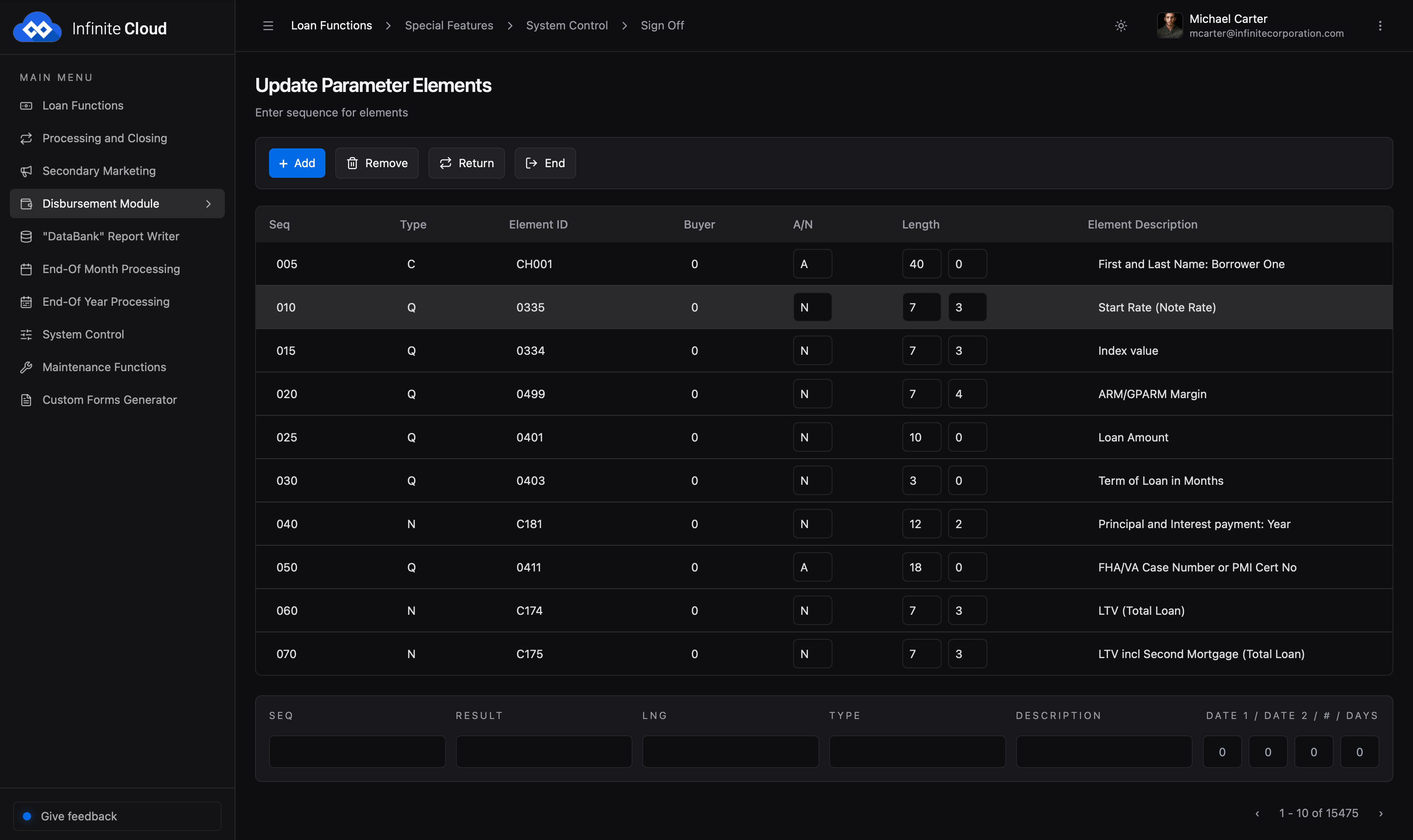
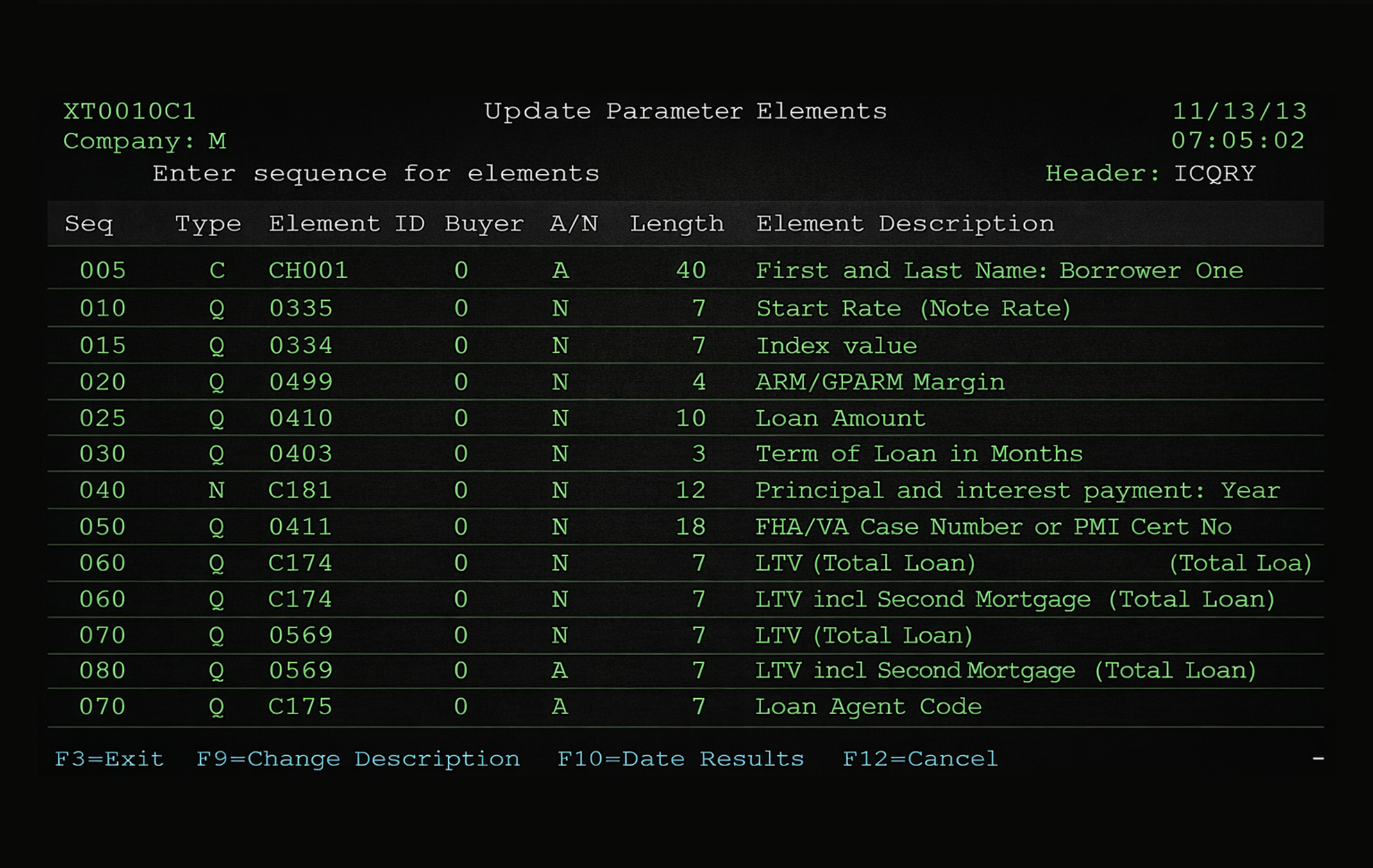
Green screen
Original IBM i 5250 green screen
The original 5250 green screen
Web UI
IBM i screen rendered as a modern web interface
Rendered as a modern web interface
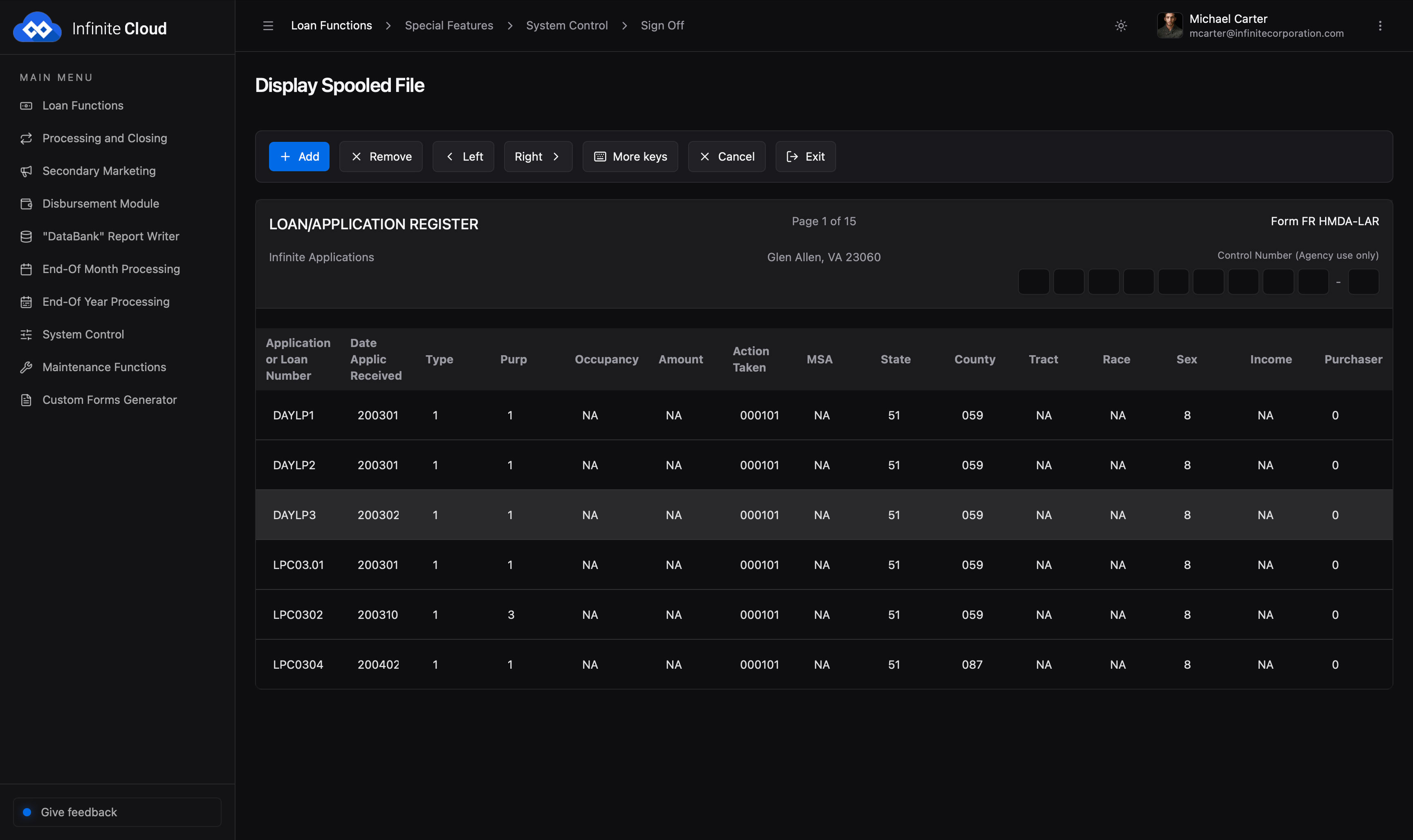
Web UI
Another IBM i application screen converted to a graphical web interface
Another converted application screen
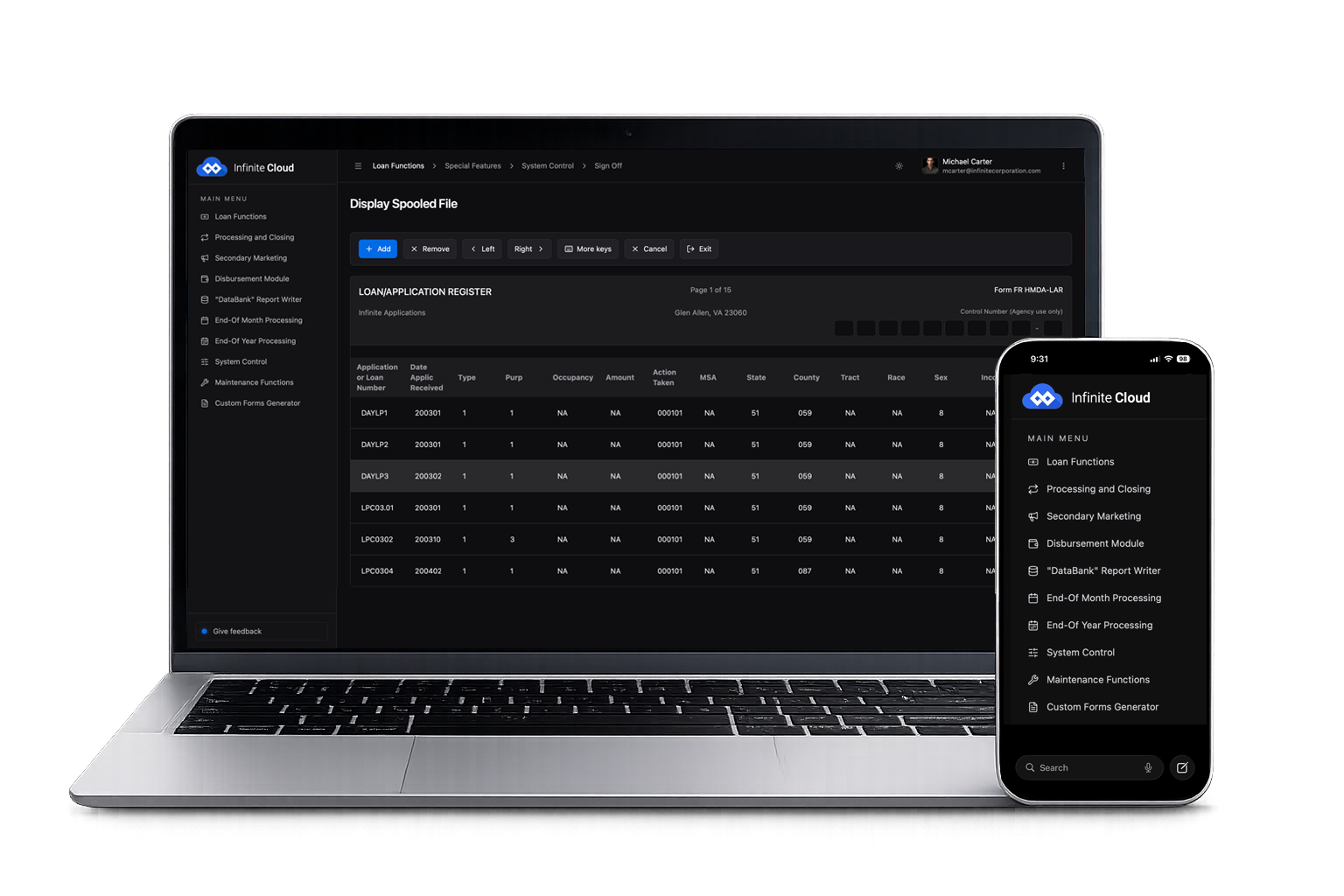
Any device
Infinite Cloud interfaces running on desktop, tablet, and phone
Runs in any browser, on any device
The problem with traditional GUI modernization

Most GUI projects take months. Some take years.

Previous-generation tools for IBM i required developers to manually redesign every screen, hand-coding hundreds of customized interfaces. By the time the project finishes, the screens were often unwieldy, slow, and outdated. Infinite Cloud removes the customization step entirely.

01

Tedious screen-by-screen work

Traditional GUI tools require developers to manually map every field, every screen, every menu. Hundreds of hours for hundreds of screens.

02

Inconsistent results

Because each screen is styled independently, the resulting UI lacks a unified design system. Every separate developer leaves their own fingerprints.

03

Slow, brittle, hard to maintain

Every time the underlying 5250 or DDS changes, the GUI customization has to be re-done. Modernization projects that fail 6 months in go live.

How Infinite Cloud works

A recognition engine, not a redesign project.

Infinite Cloud uses a sophisticated 5250 recognition engine to read your green screens — fields, menus, subfiles, command keys, all of it — and render them dynamically as graphical web interfaces. The recognition happens at runtime, not at build time, which means no manual mapping is required.

Point, click, deploy. That's the process.

Connect Infinite Cloud to your IBM i environment. The engine reads your existing 5250 screens and produces equivalent web pages — complete with form fields, subfile grids, function-key handlers, and navigation — automatically.

  • Standardized look and feel across all screens, no per-screen design work
  • Renders in any modern browser — Chrome, Edge, Safari, Firefox, mobile
  • Function keys (F1, F12, etc.) become labeled buttons; subfiles become scrollable tables
  • Native keyboard shortcuts preserved for users who prefer them
CUST0401 · rendered
RECOGNITION ENGINE
 
field: CUSTNO ─► input[number]
field: NAME ─► input[text]
subfile: ORDERS ─► <table>
cmdkey: F3 ─► button "Exit"
cmdkey: F5 ─► button "Refresh"
 
✓ rendered in 18ms

More than a screen. It's an integration layer.

Because Infinite Cloud's underlying engine is object-oriented and web-based, every rendered screen is also exposed as an XML-capable object. That means your IBM i applications can integrate with J2EE, .NET, React, mobile apps, partner APIs — anything that speaks HTTP — without writing custom integration code.

  • Every screen automatically exposed as a RESTful service
  • Service-Oriented Architecture (SOA) capabilities built in
  • Integrate with modern frameworks: Spring, .NET, Node.js
  • Mobile-ready out of the box
Screen → Object → API
5250 SCREEN
 │
{ "object": "CUST0401",
  "endpoint": "/api/orders",
  "method": "GET" }
 │
REST · SOAP · XML · Mobile

Modernize the interface. Then exit the platform.

Infinite Cloud works on IBM i today — and continues working after your applications have been recompiled to native Linux with Infinite i. Customers typically deploy them in stages: GUI first to deliver immediate user value, then platform migration to deliver infrastructure savings.

Phase 1 — Deploy Infinite Cloud: modern UI in weeks, no platform change
Phase 2 — Run Infinite i compatibility scan: confirm migration timeline and price
Phase 3 — Recompile to Linux on AWS / Azure / GCP — same UI, native infrastructure
Same browser experience for end users across all three phases
Phase 1
Infinite Cloud
Modern UI · weeks · no platform change
Phase 2
Compatibility Scan
Free · confirm timeline & price
Phase 3
Infinite i Migration
Native Linux on AWS / Azure / GCP

See your green screens running in a browser this afternoon.

Send us one representative 5250 screen — a customer-maintenance screen, an inventory inquiry, anything. We'll render it as a modern web interface and send it back the same day. No login required.

Or book a 15-minute live demo with your own applications

The Infinite i platform and its add-ons

Infinite i at the core — with add-ons for the interface, data, and developer experience.